
Creating the PERFECT LinkedIn Status Update [infographic]
Did you know that updating your LinkedIn status at least 1x per week will provide you with 10x more opportunities?
LinkedIn may not always be the “sexiest” of all the Social Media sites, but it certainly can be one of the most powerful – but you’ve got to use it!
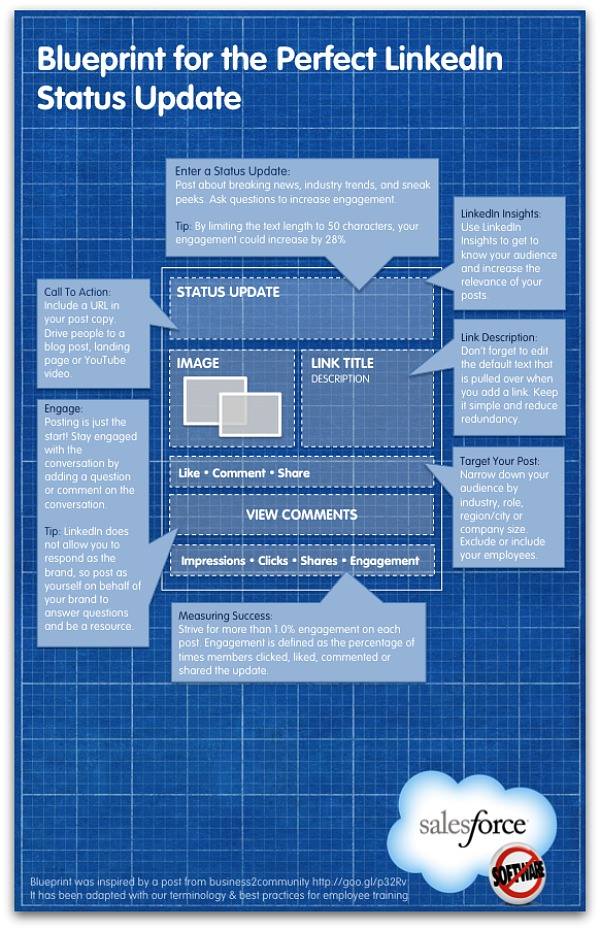
This following infographic from Salesforce is a great visual on what you need to do to make the PERFECT status update.
What to post:
- Breaking news
- Industry insights
- What’s going on at your company (new client? involved with a charitable event?)
- Announce new products and services
- Leverage the amazingly useful LinkedIn Today content aggregator and share a useful article!
Make sure it’s relevant to your target audience. It’s not what YOU want to share, it’s what THEY want to hear.
Tip 1: Limit the post to 50 characters to increase engagement by 28%
Tip 2: Look at your insights (statistics) to see what gets the most attention and click-thrus
Tip 3: Add a link or a call-to-action for more information
Tip 4: Encourage participation and engagement. Ask questions!
Note: When you SHARE information (3rd party link), you can narrow down who you’re sending it to, whether you want it to reach a specific LinkedIn Group or individual.
When to post:
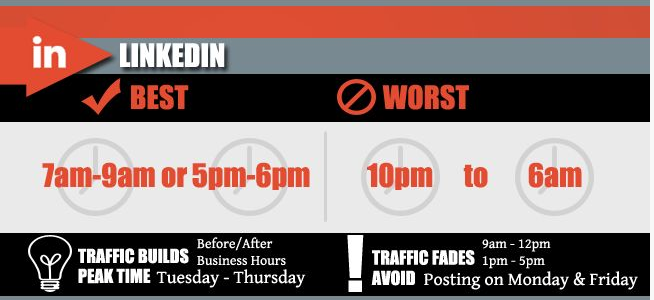
According to this snippet from an infographic by Social Caffeine, the ideal times are:
- 7 a.m. to 9 a.m. or 5 p.m. to 6 p.m.
- Tuesday to Thursday
Post consistently with quality content!
Why should you post?
As Jonah Berger states in his book Contagious – “top of mind is tip of tongue”.
Positions you as an expert and the “go-to” person in your industry
So what do YOU think goes into a PERFECT status update?
Answer in the blog below.
