
Don’t Worry About Choosing the Biggest AI Model – Focus on How You Use It
I have a confession. This weekend, I got completely lost trying to figure out which AI model I should be using.
GPT-5.5 Instant? GPT-5.5 Thinking? Claude Sonnet 5? Opus 4.8? Fable 5?
I’ve been teaching the fundamentals about how to think with AI for a few years now. I’m not a technologist. I’m a marketer and an instructor.
I haven’t really paid attention to the models themselves because I was just using the model that came up as a default.
Turns there are different categories with different strengths.
In Claude specifically,
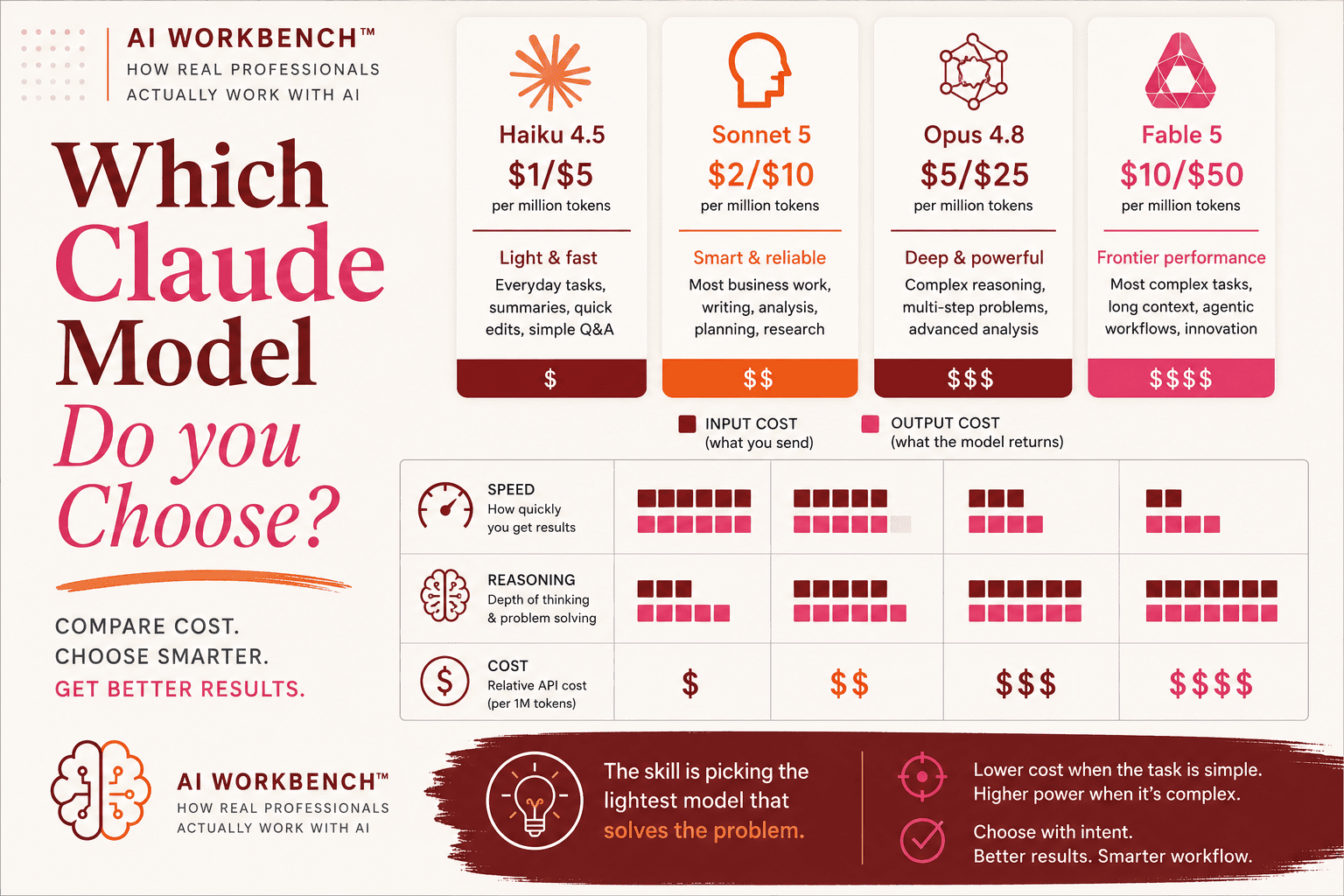
Haiku runs like a sprinter.
Sonnet handles the everyday grind.
Opus and Fable reason their way through the complex stuff.
Pick the wrong one for the job and you’re either overpaying or undershooting. Either way, you waste tokens and time.
I’m using Claude so much, I keep maximizing my tokens. I start exploring one angle and go down into a deep rabbit hole as I continue to learn how to maximize AI to its fullest potential.
Once my Claude tokens are used up, I pop over to ChatGPT to keep thinking somewhere else.
Sunday morning I realized is was in a very messy middle and I needed a bit of a wake up call.
I have to practice asking myself the following before I begin:
- What am I trying to accomplish right now?
- Is this a conversation where I steer every step, or
- Is this a task I can hand off with clear success criteria?
If I’m thinking through a problem, exploring an idea, building on something, I should toggle to Sonnet 5 on Claude. It’s my reasoning partner that I steer. Cost is reasonable. Speed is good.
If I’m formatting a research file or pulling text from a document, I should toggle to Haiku. Why pay 5x more for a more powerful model?
If I’m writing something ? I’ll use Opus 4.8 or higher. This model is great for strategy, positioning and executive level perspective.
If I’m building something over multiple days where consistency across files matters? That’s Fable. (We’d all been given more access to this model this weekend, so I was grinding hard to get a lot of major systems thinking and operational work done.)
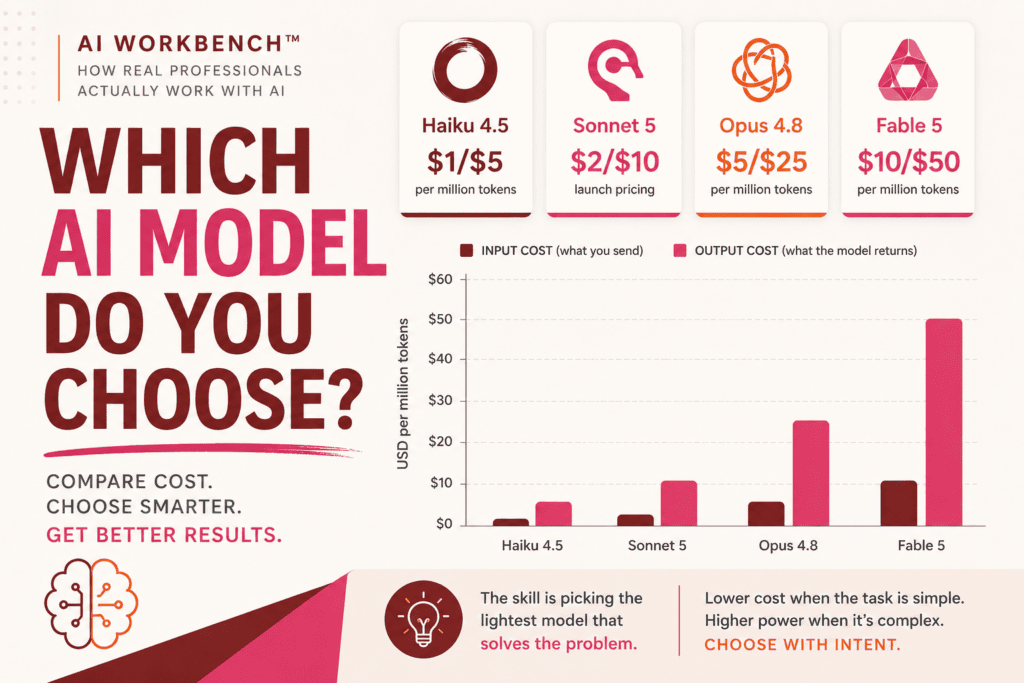
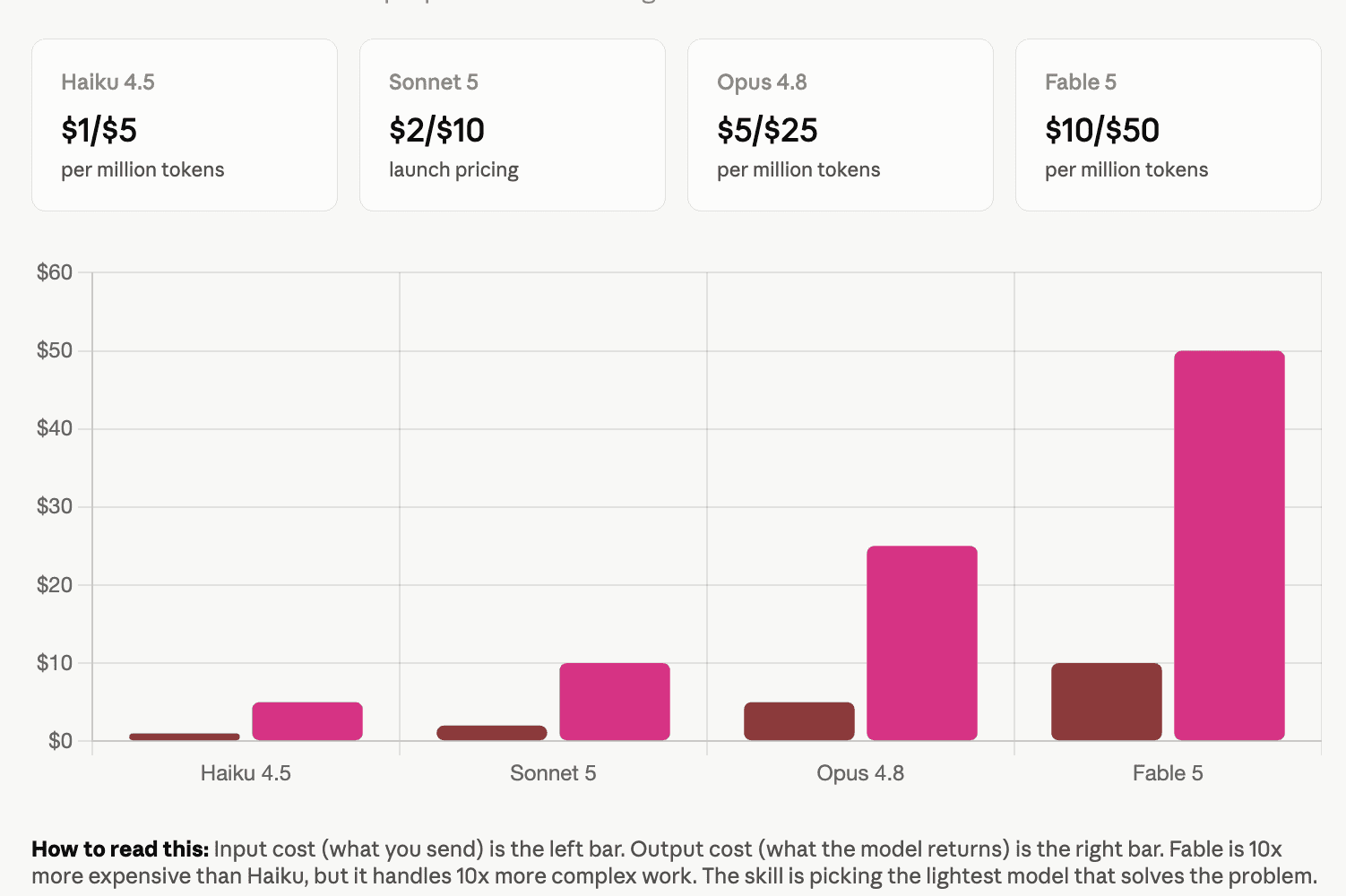
This graphic will undoubtedly change, but as of July 6, 2026, it should give you an idea visually about how the Claude tokens work based on the model.
Now, let’s compare and contrast between my two favourites: Claude and ChatGPT:
Start with Claude:

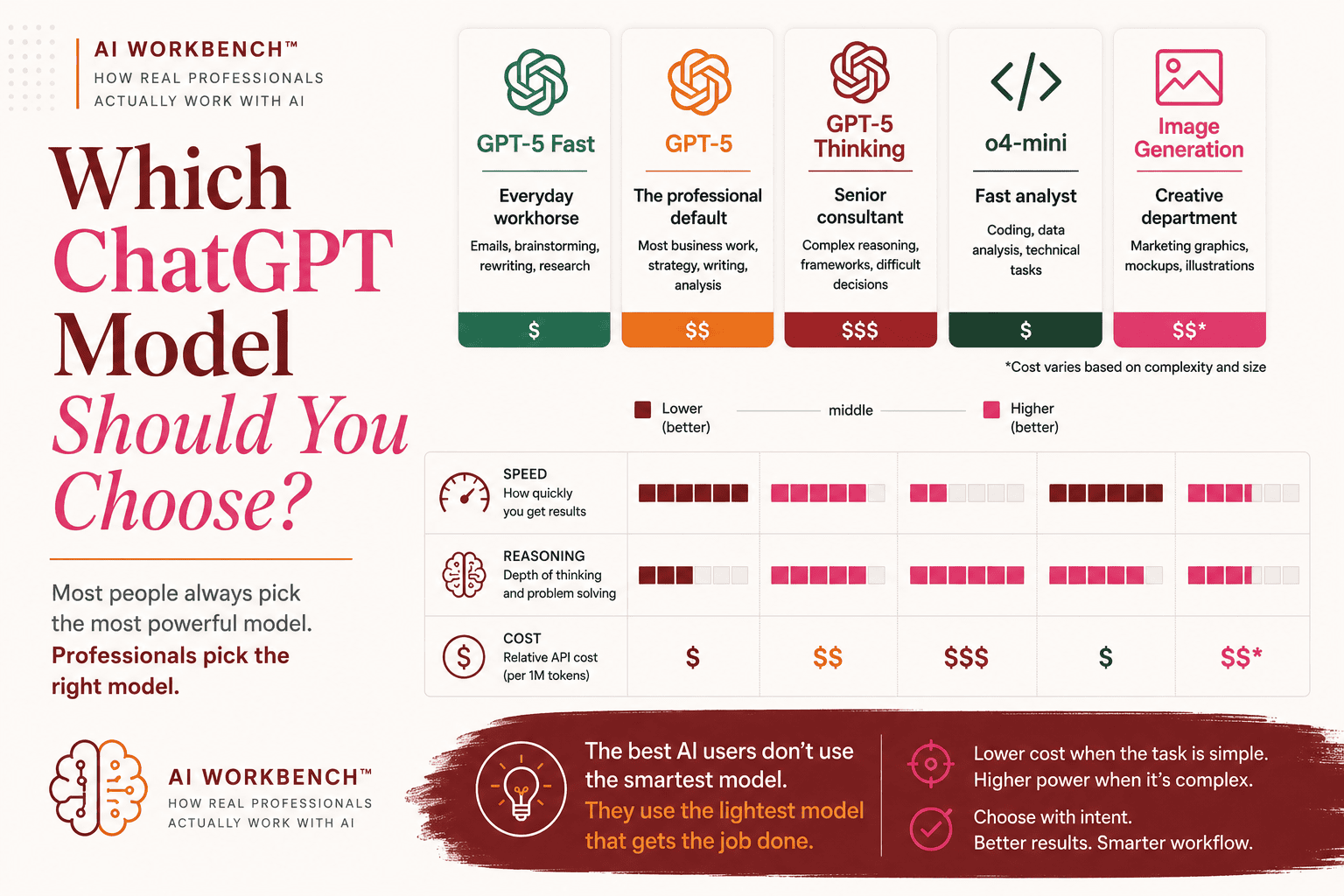
And now ChatGPT:
A different look: Claude vs ChatGPT
| Claude | ChatGPT |
|---|---|
| Excels at long-form writing and editing | Excels as an all-around AI workspace |
| Outstanding for structured documents, reports and strategy | Outstanding for research, analysis, writing and multimodal work |
| Better at maintaining context across lengthy conversations | Better at switching between text, images, voice, coding and data analysis |
| Fewer built-in tools, but exceptional reasoning | Rich ecosystem including Canvas, Projects, Deep Research, image generation, Advanced Voice and custom GPTs |
| Often preferred by writers, consultants and analysts | Often preferred by marketers, business professionals, developers and creators |
| Feels like collaborating with an editor or strategist | Feels like having an entire AI productivity suite |
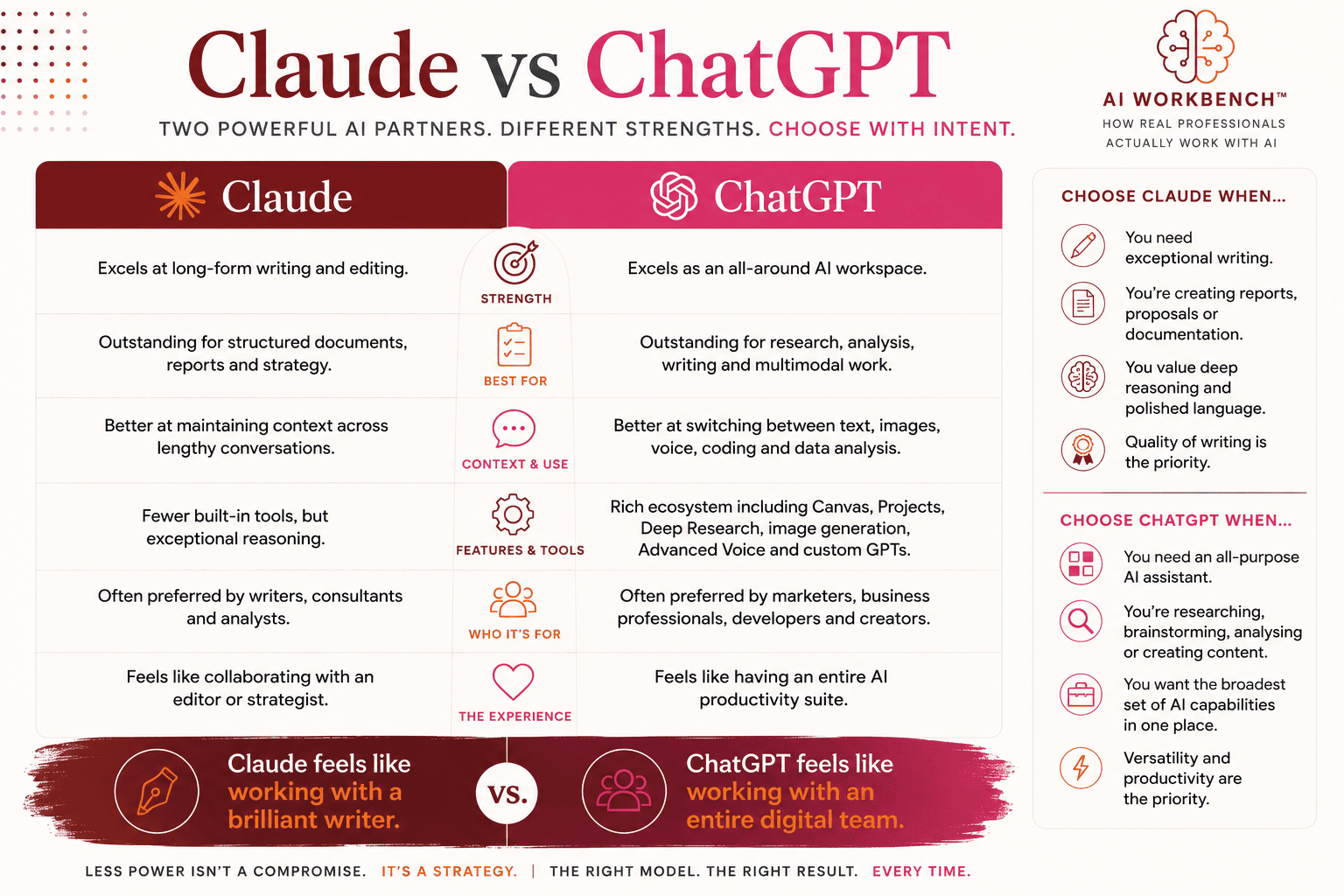
Ultimately, I don’t want you to be thinking about an “either/or” but a “yes, and” (and remember, there’s also Copilot, Perplexity, Gemini, Grok and other too). These are just the two I’m using most often right now.
It’s not about the model or the tool, but how are YOU using it to accomplish your goals.
Something else I wanted to share with you, in case you keep maximizing out your tokens.
Here are a few ways to maximize your Claude tokens per use:
- Open a new chat for a new idea. Keep the same kinds of content in a Project folder. The more you go down the rabbit hole, the slower things get and the thinking gets muddier.
- Editing your first draft is better, faster and cheaper than asking your AI to start over. In fact, ask the AI to share drafts without formatting in your brand colours. Use the prompt to use your letterhead and make it look pretty once you’ve finished your drafts.
- Skip the pleasantries. I’m a good Canadian so I typically use”please” and “thank you”, but these are token you pay for. Save the warmth for people, not AI.
- Build a brand voice file. As Claude to create a brand voice markdown document (MD) that names your voice, your thinking style, your banned words, your formatting rules. You’ll want to upload examples so it understands the nuances of who you. are.
- Load your brand voice MD at the start of every writing conversation, or include the file in your project.
Here’s why your brand voice MD works: When you hand your voice to AI, you shouldn’t have to re-teach it who you are every conversation. Your brand voice file becomes the infrastructure that holds the work. You don’t brief differently. The AI doesn’t guess. Both of you just work faster.
The brand voice file also does something subtler, it forces you to know yourself. You need to be specific about your thinking style instead of being vague and generic. If you can, name your actual principles instead of hoping consistency happens by accident.
And focus on matching the work you’re doing to the model. Make sure the output matches your voice. Edit instead of rebuild. Skip the filler.
The names and power these models have will change. AI is only going to get better, strong and faster from here.
The principles and foundational work won’t.
So here’s how to get started creating a Brand Voice markdown file:
Open a new chat on Sonnet 5.
Paste this prompt:
“Build my brand voice file. I’ll answer five questions, you turn it into a markdown reference I can load at the start of every writing conversation.
- Name three pieces of your writing you’re proud of. What made them work?
- What words do you use that nobody else in your space uses the same way?
- What phrases do you never use? (LinkedIn filler, jargon, anything that feels false)
- How do you start pieces? How do you end them?
- One formatting rule that’s yours: paragraph length, bold/no bold, commas, structure, rhythm.
Don’t overthink. Just answer.
Claude will synthesize into a one-page markdown file you can copy and paste at the top of every writing conversation.
I know I’ve shared a lot in this post and my brain is crammed full of information. I hope there are a few nuggets in this overview that help you to get clarity on your journey to using AI successfully!
