Have you ever been endorsed for something that isn’t within your skill set?
LinkedIn endorsements are front and centre when you log in at any given time. The infrastructure encourages you to click and endorse your connections.
This one-click way to send a “little LinkedIn love” is both sweet and annoying.
I’ve often been been asked how to either delete, amend or change when someone endorses you for something that doesn’t fit within your skill set.
Here’s how to do it:
Step 1: Click Profile > Edit Profile
Step 2: Scroll down to the Skills & Expertise section
Step 3: Click on the Edit link (which will be highlighted in blue)
Step 4: Use the “Add & Remove Tab” to add and remove certain skills.
Use the “Manage Endorsements” tab (as seen below_ to show or hide any specific people who have endorsed you.
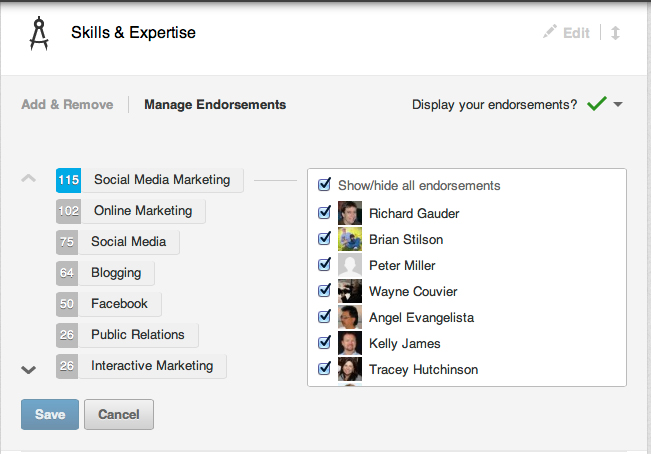
Recently, during a training session a person told me that they often look to the Skills and Endorsements to see if someone is qualified for the position they are filling.
If they have no endorsements, they may be disqualified from the opportunity.
While endorsements are a simple one-click way to say “good job” they should only be used when you can actually stake your professional reputation on what you’re endorsing and whom your endorsing.
If you don’t like who has endorsed you or what they’ve endorsed you for, then use the steps above to make the changes to your LinkedIn profile.
Any other questions about LinkedIn? I’m always happy to help! Email me at leslie {at} punchmedia.ca with your biggest challenge or urgent question.
Or, if you simply like this tip, then share it with your Social Network.

About Leslie Hughes
Leslie Hughes is a LinkedIn Optimization Specialist, LinkedIn Top Voice, and Corporate Trainer with over 25 years of experience in digital marketing and LinkedIn profile writing. As the Principal of PUNCH!media and author of "CREATE. CONNECT. CONVERT," Leslie helps executives and professionals optimize their LinkedIn profiles, generate leads, and attract higher-paying clients. Recognized as a LinkedIn Top Voice—an exclusive honor from LinkedIn—Leslie is a trusted authority on LinkedIn profile optimization, AI-driven marketing strategies, and digital identity management. Her expertise has been featured on CBC Radio, where she was called a "Social Media Guru," and on CTV’s "The Social," where she shared strategies for managing digital identity. Leslie empowers professionals to leverage generative AI tools like ChatGPT to enhance marketing strategies, boost efficiency, and create impactful content that converts. She helps businesses understand how to use LinkedIn for lead generation and how AI can revolutionize their digital marketing efforts. Leslie has worked with top organizations like Investment Planning Counsel, Guardian Life Insurance Company of America, JLL, and Franklin Templeton, optimizing LinkedIn profiles and providing corporate training that delivers measurable results. Leslie is a former college professor and co-lead instructor for Ontario Tech University’s Social Media Marketing and Digital Management Certificate. Whether you need a LinkedIn profile writer, corporate trainer, or AI marketing specialist, Leslie Hughes can help you elevate your digital presence and transform your marketing strategy. Ready to take your LinkedIn profile and corporate training to the next level?
Learn more at www.punchmedia.ca.

