
LinkedIn Tips
The “Secret” Way To Send A LinkedIn Connection Request via iPhone
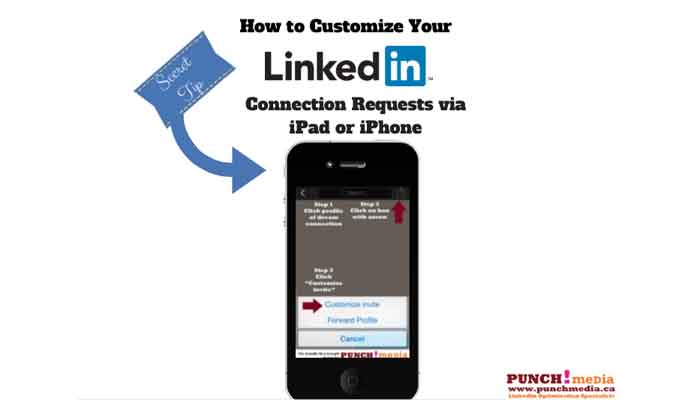
You should ALWAYS personalize your connection request on LinkedIn. Why? It’s a good idea to refresh their memory as to how you know them – they will be more likely to accept your invitation. It helps to facilitate dialogue and allows you to go further than just adding people to your online Rolodex If you…
Read MoreSee how to send a message without using LinkedIn’s InMail

2019 Update: You can no longer send messages via Groups this way. Please read on if you’re interested in learning more about the benefits of LinkedIn’s InMail There are many terrific advantages you can take advantage of by investing in a Premium LinkedIn Account: You can do a much deeper dive in your research You…
Read MoreHow To Backup Your LinkedIn Data: Connections & Archived Data
If your computer has ever crashed, and you’ve lost a ton of data, you know the horror of losing your work and contacts. I bet you never thought about backing up your contacts and data on LinkedIn! What would happen in the unlikely event that LinkedIn were to crash? Would you still have that database…
Read MoreWhich is more important on LinkedIn? Your Personal Brand OR Your Business Brand

LinkedIn is undoubtedly the biggest business network in the world of Social Media and in my opinion, the most powerful for building your brand and converting business. When I work with businesses and professionals to help create a strong LinkedIn presence, I focus on 3 key areas that create a strong first impression: A professional…
Read MoreHow To Respond To LinkedIn Connection Requests From Strangers

I love connecting with people on LinkedIn. I believe this powerful channel is best used when you deepen relationships with your network. I highly recommend ALWAYS sending a personalized note with connection request (or following up with a note whenever possible). But there are a ton of people who don’t know this etiquette. So how do…
Read More