

How to separate your professional friends from your personal friends on Facebook.
Since the inception of Social Media, our personal and professional lives often meld together.
Our professional contacts want to “friend” us on Facebook and often we’re left wondering whether or not we should allow these professional contacts into our personal space.
Some have a hard and fast rule not to mix business with pleasure.
Others feel like they may offend their professional network by not connecting with them.
There is a way you can have the best of both worlds. Here’s how.
Step #1: Lock all your Facebook settings and set them to private.
Go through your privacy settings and set every single section to the highest privacy setting. This includes all aspects of your timeline and your photo albums. (You will probably have to go through this exercise with a laptop or a desktop). Once you think you’ve got your privacy maximized, click on the “View As” link to see how the public sees your profile.
(You’ll be surprised what people can see about the information you’ve posted on Facebook).
Step #2: Create a customized list on Facebook
Visit one the page of your connections, and the area where their “cover image” sits, you’ll see a grey button that says “Friends”. Mouse over that button and a drop down menu will appear. Click on “Add to another list” and then “+ New List”.
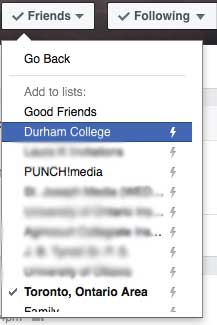
Create the name for your new list (i.e. business contacts).
Go through all your connections and begin to your professional contacts to this list.
Step #3: Go back to your Settings, and click on the Privacy section.
Click on “Who can see your future posts” and set it to “Custom”. Click on that link and decide which lists you want to hide the information from.
I keep my settings to “friends” but exclude certain business lists.
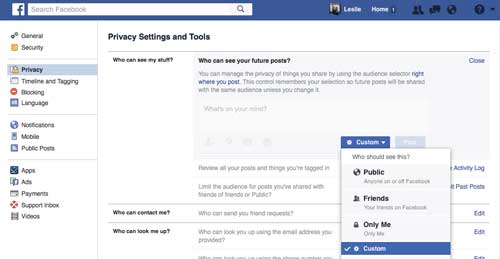
This way, I control the information I want to share with certain people.
Setting up these lists can be helpful to prevent your business connections from seeing your personal information, but always remember – no matter how “private” you may think your content is, Facebook data mines your content so they can target you with advertising. Also privacy settings change ALL the time, so never publishing anything you wouldn’t want seen on a billboard.
If you found this to be useful, please share it with your network.
 Leslie Hughes is a LinkedIn Optimization Specialist, Professor of Social Media, Corporate Trainer and Principal of PUNCH!media
Leslie was called a “Social Media Guru” by CBC Radio and has been working in digital marketing since 1997 and founded PUNCH!media in 2009. PUNCH!media clients include The Children’s Wish Foundation of Canada, Guardian Life Insurance Company of America and TVO.
PUNCH!media’s goal is to empower through education and help executives gain confidence in their online presence so you convert higher-paying clients.
Leslie provides LinkedIn corporate training and LinkedIn profile writing for executives and teams who need a strong, powerful presence online.
NEW: Check out Leslie’s newly launched book “CREATE. CONNECT. CONVERT.”
It’s designed to help empower you to effectively build a strong professional brand, connect properly with higher quality clients and prospects to ultimately convert clients.

