
Getting “Social Proof” With LinkedIn Testimonials
One of the best ways to build trust so that you position yourself as an expert (and convert business) is to showcase your LinkedIn testimonials.
Social proof is a type of “herd behaviour” and one of Dr. Robert Cialdini’s principles of influence.
When someone says you’re terrific, then others are more likely to feel the same.
One of the best ways to have your business competency acknowledged is via LinkedIn testimonials. (Not to be confused with endorsements, which are a different story).
Here are 2 different approaches for obtaining a LinkedIn testimonial.
Approach #1: Ask For One
This approach is best when you’re asking a former boss or client to provide you with a testimonial.
You simply want to send them an individual request. (If you’re smart, you’ll do the “heavy lifting” for them. Provide them with key areas they can focus on, or, better yet, write the testimonial for them and let them modify or approve it).
How to ASK for a recommendation on LinkedIn:
- Click “Profile” in the navigation bar.
- Directly beside the grey “EDIT” button, you will see a small arrow that points down.
- Hover over that button and the second prompt will allow you to “Ask to be recommended”
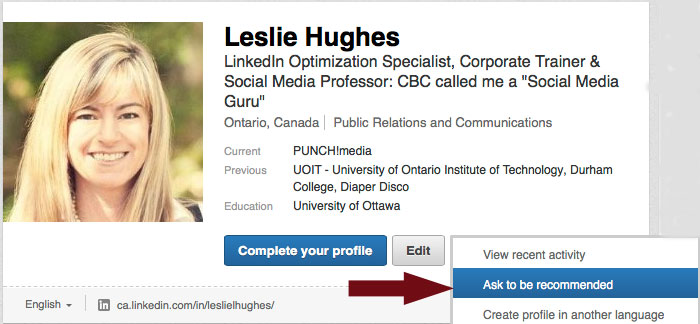
The next page that will appear will have a few fields you will need to customize.
PLEASE NOTE: Only send ONE request at a time and personalize/customize the requests. Not only will you be more likely to receive the testimonials you want, but you can specifically ask for them to highlight certain areas or jobs you worked on together.

Approach #2: Do unto others….Write a recommendation for someone you would stake your professional career on.
Because of the law of reciprocity, when do write a testimonial for someone, they feel compelled to to write one in return (and it helps that LinkedIn also asks if they would like to write one in reply).
How to GIVE a recommendation on LinkedIn:
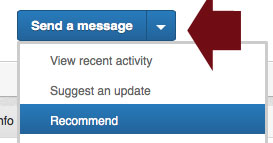
- Simply visit the personal profile for one of your connections.
- Beside the “Send a message” button, click on the downward arrow and click on the third link marked “Recommend”
- LinkedIn will prompt you to identify how you will be recommending them:
- as a colleague (you worked with them at the same company
- as a service provider (you hired them as a client)
- as a business partner (you worked with them at different companies)
- student
This area will appear next:

- You will then identify your relationship, your title at the time, their title at the time and the testimonial.
- Be sure to customize a personal message to your connection.
Once you obtain your testimonial, you can take screen grabs and use it on your marketing material or website.
Testimonials/recommendations are VERY powerful sales tools. Whether you are simply looking to position yourself as an expert or you are converting business, these kudos help to showcase success stories and build trust.
Now it’s YOUR turn…how have YOU effectively obtained testimonials and recommendations? Provide your 2 cents in the fields below.
================
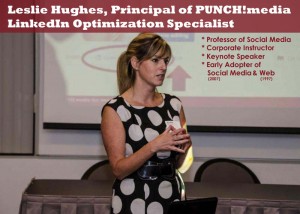 About Leslie Hughes & PUNCH!media
Leslie is a LinkedIn Optimization Specialist, Corporate Social Media Trainer and Principal of PUNCH!media
Founded in 2009, with clients such as The Children’s Wish Foundation of Canada, Guardian Life Insurance Company of America, and The University of Ontario Institute of Technology’s Management Development Centre, PUNCH!media works with organizations – like yours – to help you feel confident with your strong, branded online presence.
From defining clear strategies, to content development and deployment, we help you save time and build business. Whether you’re using LinkedIn to connect with business associates or Facebook to connect with consumers, we help you connect with the right audience at the right time using the right channels.
Is YOUR LinkedIn profile optimized to position you as an expert and convert business?
Let me help you position you and your company as experts on LinkedIn –> leslie @ punchmedia.ca
www.punchmedia.ca
leslie @ punchmedia.ca
