

Interested In Getting More Inbound Leads?
Showcasing yourself properly on the world’s largest business network is essential.
Your prospective clients are researching you to see if you’re someone they can trust to help solve their problems.
An incomplete profile screams “I don’t care enough about my own presence online, so I’m not going to care about yours either”.
I’m happy to help you do a deep dive on optimizing your presence (click here for more information).
In the meantime, here’s a tip that will help drive traffic and views back to your profile: Customize your LinkedIn Public Profile URL
Step 1: From the top navigation bar, click “Profile” then “Edit Profile”

Step 2: Click the blue pencil beside your current URL.

If you haven’t changed yours yet, it likely contains a bunch of numbers and letters.
Step 3: In the top right hand corner, click on the pencil beside your URL and the field below will allow you to make changes.
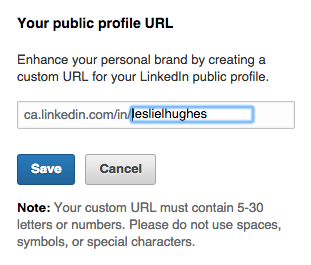
Step 4: Change the standardized URL so that it includes your first and last name.
Having a customized URL – ideally with your first and last name, will allow you to drive inbound leads to your LinkedIn profile and extend your network of connections.
This short video will also walk you through how to customize your public profile URL:

Now that you have a customized URL, you can share it on your marketing material
- Put it into your email signature
- Include it on your business cards
- Share it below!
If you liked this tip, please be sure to share it, or click “LIKE”
Want to optimize YOUR LinkedIn profile? I interview, write and optimize LinkedIn profiles for executives. If you would like to rock your LinkedIn profile, email me at leslie@punchmedia.ca
 Leslie Hughes is a LinkedIn Optimization Specialist, Professor of Social Media, Corporate Social Media Trainer and Principal of PUNCH!media
Leslie was called a “Social Media Guru” by CBC Radio and has been working in digital marketing since 1997 and founded PUNCH!media in 2009. PUNCH!media clients include The Children’s Wish Foundation of Canada, Guardian Life Insurance Company of America and TVO.
PUNCH!media’s goal is to empower through education and help executives gain confidence in their online presence so they convert higher paying clients.
www.punchmedia.ca
leslie@punchmedia.ca
Click here to sign up to our weekly newsletter! www.punchmedia.ca/email.html

I’ve read articles and posts from a number of people stating that creating a URL other than the one provided by LinkedIn actually retards a profile in the search function. True or false?
Hi James. I’ve never heard anyone state that creating a URL other than the one provided by LinkedIn would inhibit search functionality. If this were the case, why would LinkedIn allow us to customize our URL? In fact, in their help section, they encourage you to change it and use it across all forms of marketing material:https://help.linkedin.com/app/answers/detail/a_id/85/ft/eng
Thanks for your question!