The Easiest Way To Write Your LinkedIn Summary – A Plug and Play Swipe File
I am so excited about this.
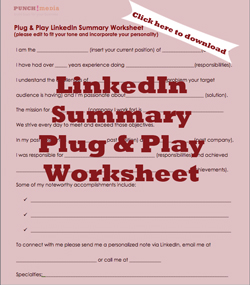
I spent an entire day putting together a comprehensive LinkedIn Summary “Swipe File” so that you have an easy-to-follow “plug & play” way to create a really strong presence and showcase yourself as an expert.
During my research, what I found to be incredibly surprising was how many people don’t have a through and complete LinkedIn Summary.
Some have a sentence or two. Some don’t write anything at all.
Your LinkedIn Summary is a HUGE opportunity to get a flood of inbound leads.
It’s one of the only times you can publish all your accomplishments without sounding like a braggart. So toot your horn!
According to LinkedIn, these are 10 of the most overused buzzwords you should not use (but I have to admit, it’s a challenge not to use at least one of them):
2. organizational
3. effective
4. motivated
5. extensive experience
7. innovative
8. responsible
9. analytical
10. problem solving
I found a lot of LinkedIn Trainers used bullet points and icons such as
■ ♦ ◆ ● ► ◄ ► ✓ ✔ ☑ ☒ ✖ ✕ ✘ ★✰ ✚✪ ✯ ✜ ☛ ☚ ☜ ☝ ☞ ☟
© ® € ₤ ℠ ™ ♩ ♪ ♫ ♬♭♮♯ ✆ ☎ ☏ ✉ ✍ ✎ ✏ ✑ ⌨ ☀ ☺♘ ♝ ☮ ✈ ♥ ☠ ☊ ☗ ☃ ☂ ☁
☲☲☲☲☲☲ ▓▒░▓▒░▓▒░▓▒ ▄▀▄▀▄▀▄ ▬▬▬▬▬▬▬▬▬
Once you download my example, you’ll see I’ve used them but sparsely just to help use more white space. Do NOT use any of these too much, otherwise they look “spammy” and unprofessional.
Besides, you’re using up precious character spaces with icons when you could be using them on telling your story!
Download your “plug and play” swipe file so that you can simply fill in the blanks to help flesh out your summary and make a great first impression.
When creating your LinkedIn Summary, it’s important that you:
- remember your keywords:
what will your audience key in to “Google” to search for you? Use these keywords several times throughout your summary and variations of it as well. - write in 1st person:
it’s much more “conversational” than John Smith is an expert - showcase what makes you unique:
what makes you different than your competitors? - include your accomplishments:
the more concrete results, the better. - evoke emotion:
what pain are you solving? - indicate who is your target audience:
your perfect client will be more likely to connect with you if they see you help people in their industry - include a call-to-action:
how do you want people to get in touch with you? - list your specialties:
another opportunity to use those keywords and get ranked higher in the search results
Can you add anything else to this list? Suggest some in the fields below.
Along with the Swipe File, I’ve included examples of completed Summaries for:
- my own profile
- Certified Business Valuator/Forensic Accountant
- Managing Director of Professional Services
- Marketing Director
I just know you’ll find the LinkedIn Summary Swipe File to be incredibly useful. It’s also included in the LinkedIn Training program that’s available here on this site for only $97. You can check out the whole program here.